

I've had several request, on and off the blog, asking how to superimpose images. Be aware this is not my expertise, but I'll try to explain it as simply as I can.
Photoshop.
That's the starting point.
- First you need to open two images in photoshop. (They won't be together.)
- Resize them to be the same size.
- Copy one of them.
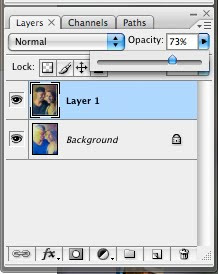
- Click the other photo and paste your second image in. It should completely cover the other image in a new layer. (Now they're both together.)
- Slide the opacity bar until you can see both images.
- The move tool allows you to position them.

Hope this helps...
